
HELP needed!!!!!

This site may earn a commission from merchant affiliate
links, including eBay, Amazon, and others.

PHR

Well-Known Member
Messages
88
Reaction score
0
Location
SOUTH AFRICA
:mad:
I have tried and tried but it is impossible for me to upload any pics - sheeeeez it is very frustrating. Before any clever comments, I know I am not the sharpest knife in the drawer, but as with everything, it has its limits(my brain).
So if there is any easy way to do it,please let me have it!!! Step by step.
 
its easy open an account with a picture hosting site like photobucket. upload your pics to there then copy and paste the
 
Here is a great alternative to using photo specific hosting sites such as photobucket or Flickr to embed photos is to use the free file backup/sync service Dropbox. The great thing about Dropbox is that you can not only use it to post photos within forums, but the service can also be used to backup/sync files and folders between computers and mobile devices. I've been using it for some time now and love it. For anyone interested, or for those who already have an account, here's what you do:

  1. Sign up for a free Dropbox account here.
  2. Download and install the Dropbox client software (available for Windows/Mac/Linux).
  3. Drag and drop any photos you wish to share into the "Public" folder within the newly created Dropbox folder on your computer.
  4. From your Dropbox "Public" folder - right click on the image and select: Dropbox > Copy Public Link
    how-to.png
  5. Insert the link into your post by clicking the "insert image" option.
  6. Presto...your photo is now posted/backed up/synced and can be accessed from any computer or mobile device you use or logon to.


Feel free to give it a try!

lifes-been-good-i-reckun.jpg
 
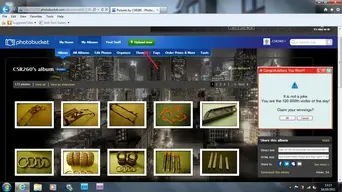
Sign up to photobucket/and upload now

Untitled-1.webp

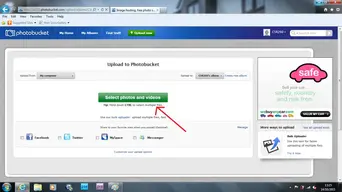
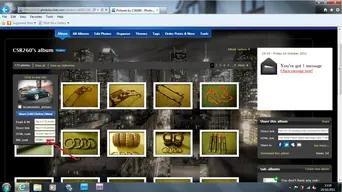
Select photos and videos...

Untitled2-1.webp

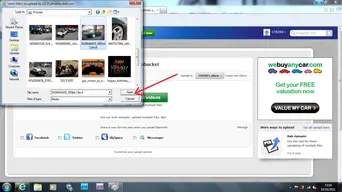
Pick the photo you want to upload to photobucket...

Untitled3.webp

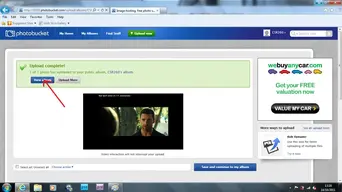
View your album after uploading....

Untitled4.webp

Copy the code from photobucket...

[ATTACH=full]32352[/ATTACH]

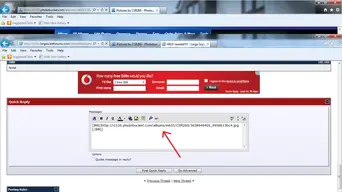
Paste the code from photobucket to LSF Forum....

[ATTACH=full]32353[/ATTACH]

Job done then it will come up on LSF Forum like this below v v v v

[ATTACH=full]32354[/ATTACH]
 

Attachments

  • Untitled5.webp
    Untitled5.webp
    58.4 KB · Views: 0
  • Untitled6.webp
    Untitled6.webp
    28.1 KB · Views: 0
  • 3638648405_995bb13bc4.webp
    3638648405_995bb13bc4.webp
    29.1 KB · Views: 0
Hey man, you oke's really did go to a lot of trouble. If I cant do it now, then I don't know.
I appreciate it a hell of a lot.
Thanx again - Peter.
 
Hey man, you oke's really did go to a lot of trouble. If I cant do it now, then I don't know.
I appreciate it a hell of a lot.
Thanx again - Peter.

"really did go to a lot of trouble" yes i did :rolleyes: :lol:

its not a problem mate.. where always here to help..


Andy
 
Back
Top