
My first paint job!

This site may earn a commission from merchant affiliate
links, including eBay, Amazon, and others.

grizzledcamudgen

Senior Member
Messages
251
Reaction score
0
Location
NW Indiana
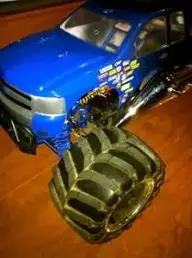
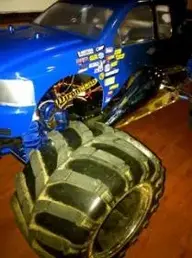
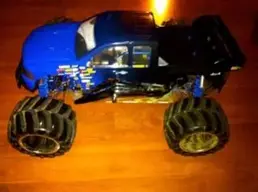
Well, I just finished painting my truck body! I still have lights to put on it and want not! I hope you all like it! :)


I was going to have Zielke paint it, as you may know but I was thinking that that's an awful lot of money for a basher! If I was just showing it off then, yeah!


I was hoping the uploaded pics would have been better! :eek: Sorry about that!
 
Here's two more pics that I couldn't get on the first post.

IMG_0707.webp

IMG_0708.webp

/monthly_2010_08/IMG_0707.jpg.ec3a95c435030d4466c0093e180728d8.jpg

/monthly_2010_08/IMG_0708.jpg.d3da1d8cf8112ab91a953186b7e6f924.jpg
 
Damn fine job man! Yours looks a lot better than what it wouldve looked like if I paint it. I still cant paint for crap! :D
 
Nice...l really like the fade....


To resize the pics better, if you have Microsoft office, you can use office picture manager to resize to a visually bigger picture that is still under the size limit..


If not, I can recommend another program to help you re-size.
 
Thanks everyone!


That bowtie in the front still is masked off (in the pics) I don't have yellow as of yet to paint it. I used spray cans to paint this body. something anyone could do! The masking was sort of a pain in some spots but if you have really wide painters tape and a super sharp xacto knife, then you'd be good to go!


If their is anyone that knows how to put pics on here at a larger size, please, let me know! I use an iMac.


I'm really glad that you all liked it! :)
 
the truck looks good for a first paint job. as far as the picture size what program for pictures do you use. and what camera do you have and how many megapixels does it have let me know. Jim
 
racetruck said:
the truck looks good for a first paint job. as far as the picture size what program for pictures do you use. and what camera do you have and how many megapixels does it have let me know. Jim
Thanks!


I'm on an iMac they are stored in iPhoto. I used my iPhone 4 w/5 megapxl camera to take the pics. I do have a separate camera that I can use, its a 5 as well.


I seen that Rob had ginormous pics on here in a thread! I was just wondering how that is done.
 
i actually put mine on photobucket then post the code on here.but as for your size of pic it's kinda cool makes it look like you have 1/18th scale rampage......
 
fat49f1 said:
:Dlooks great grizz, thats a really pretty blue.
Thank you! :)


I wanted it to match the aluminum body parts! It looks really close! I just got my Blue under belly lights today, that should make it really pop when I get those and the other lights hooked up!
 
Last edited by a moderator:
rob64n said:
i actually put mine on photobucket then post the code on here.but as for your size of pic it's kinda cool makes it look like you have 1/18th scale rampage......
oh ok, I tried to take the pic with nothing in the back ground for scale comparison. Hmmm....maybe that's a good thing! lol:)
 
grizzledcamudgen said:
Thanks!
I'm on an iMac they are stored in iPhoto. I used my iPhone 4 w/5 megapxl camera to take the pics. I do have a separate camera that I can use, its a 5 as well.


I seen that Rob had ginormous pics on here in a thread! I was just wondering how that is done.
I just checked the dimensions-resolution of your pictures that is why your pictures are so small. the pictures that we use are 640X480 pixels we have to resize them. My pictures from the olympus are 1600X1200 pixels so we upload pics to a program called picasa and i have picasa resize the pictures to 640X480 so when we upload pictures there not to big for the forum. the dimensions-resolutions of your pictures are around 319X238 pixels so you need to increase the pixel size of your pictures to 640x480 you can find the pixel size by right click on your picture and scool to properties and click and that will pull up the infomation Jim :cool:
 
racetruck said:
I just checked the dimensions-resolution of your pictures that is why your pictures are so small. the pictures that we use are 640X480 pixels we have to resize them. My pictures from the olympus are 1600X1200 pixels so we upload pics to a program called picasa and i have picasa resize the pictures to 640X480 so when we upload pictures there not to big for the forum. the dimensions-resolutions of your pictures are around 319X238 pixels so you need to increase the pixel size of your pictures to 640x480 you can find the pixel size by right click on your picture and scool to properties and click and that will pull up the infomation Jim :cool:
Ok, thanks!


I have a Picasa account! I suppose I could go that route until I figure a better or easier way through iPhoto.
 
This is just a test, I wanted to try something. This is not through picasa.Well, crap! that didn't work! I'll keep at it, I'll figure something out!

IMG_0700.webp

/monthly_2010_08/IMG_0700.jpg.6ff8adeaa8da5ca89777022092d83bf3.jpg
 
Last edited by a moderator:
OK I just looked and Picassa now uses a 3rd party to edit called PICNIC...It appears that you need to upload the original picture, then dble click the pic to open it...then choose 'edit' , this will launch PICNIC from there you can choose 640 x 480 or 800 x 600 and it will save for you.


at this point you can download the edited version (as different name so doesn't conflict with original) and upload it to here...hope this helps
 
from what i can see about the iphone the pictures are to small and it don't go to 640x480 resolution so if it was me i would take pictures with your normal camera so your pictures have the higher resolution put them in iphoto and have iphoto change the resolution to 640x480 :D
 
Back
Top