
Navigation
Install the app
How to install the app on iOS
Follow along with the video below to see how to install our site as a web app on your home screen.
Note: This feature may not be available in some browsers.
More options
Style variation
You are using an out of date browser. It may not display this or other websites correctly.
You should upgrade or use an alternative browser.
You should upgrade or use an alternative browser.
Where’s my computer nerds at? Show us your desk setups!
- Thread starter misterleon
- Start date
This site may earn a commission from merchant affiliate
links, including eBay, Amazon, and others.
links, including eBay, Amazon, and others.
![DSCF1269[1].webp](https://www.largescaleforums.com/data/attachments/66/66367-8ac504422e227d1187cd5502b3b92217.jpg?hash=KouaGdXONa "DSCF1269[1].webp")

- Messages
- 19,475
- Reaction score
- 27,691
Nice sim,

Polar_Bus
Well-Known Member
- Messages
- 754
- Reaction score
- 1,549
Thanks, I actually built it myself from scratch.Nice sim,

sweet setup ?
Twitchfast
Well-Known Member
- Messages
- 56
- Reaction score
- 44
I might consider taking a photo of mine, to be fair she's rather dusty at the moment, and I'd only show my rig  The desk is not suitable for eyes.
Press the Windows Key + R simultaneously and type "dxdiag".
Then select "Display" as shown in my printscreen.
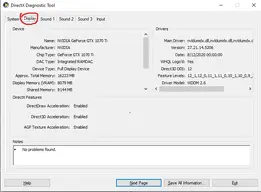
From that I can tell you whether you are able to run another monitor, though the fact you have Nvidia's Control Panel already gives me a big hint that you have a dedicated GPU and you almost certainly can run another monitor.
The problem is that I cannot tell what plugs you have because I don't know what vendor made your graphics card.
Also, this is your monitor correct?
https://www.lg.com/us/monitors/lg-24MP59HT-P-led-monitor
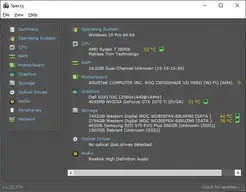
If you would like advice on subtle upgrades to speed the system up, you can always use a program called "Speccy" (I've linked it for you) - Simply install it, then show me a printscreen so I can see exactly what hardware you have.
Speccy will look something like this:
The desk is not suitable for eyes.Since you didn't get an answer;So do I just buy another monitor and plug it in?
Press the Windows Key + R simultaneously and type "dxdiag".
Then select "Display" as shown in my printscreen.
From that I can tell you whether you are able to run another monitor, though the fact you have Nvidia's Control Panel already gives me a big hint that you have a dedicated GPU and you almost certainly can run another monitor.
The problem is that I cannot tell what plugs you have because I don't know what vendor made your graphics card.
Also, this is your monitor correct?
https://www.lg.com/us/monitors/lg-24MP59HT-P-led-monitor
If you would like advice on subtle upgrades to speed the system up, you can always use a program called "Speccy" (I've linked it for you) - Simply install it, then show me a printscreen so I can see exactly what hardware you have.
Speccy will look something like this:
Last edited:
Twitchfast
Well-Known Member
- Messages
- 56
- Reaction score
- 44
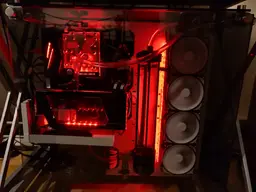
Forgot I already had a picture of my system on my Imgur account, saves trying to get another decent photo (which is bloody hard when the majority of it is glass).